Finance student at NDSU
Junior year, Banking minor
Interested in AI, markets, and useful systems
NDSU Finance Student
Exploring the intersection of finance, data, and AI to solve practical problems and build things that make information easier to understand, compare, and act on.
Junior year, Banking minor
Interested in AI, markets, and useful systems
Selected work
A local AI workflow that turns saved reels into searchable transcripts, themes, and insights.

Local-first sourcing system for importing, scoring, and matching off-market SMB acquisition targets.

AI-assisted analysis for retail ops: inventory, seasonality, staffing, and buying decisions.

A pre-purchase centering read for collectors evaluating eBay listing photos.
A research-backed case study on why AI access does not automatically create value, and how useful workflows get designed.
How I think
I clean, label, and normalize the input before asking software or AI to make judgment calls.
A good system should show what to clear, contact, review, reorder, ignore, or investigate next.
Scores, summaries, and signals should have reasons behind them, not just polished outputs.
Notes & insights
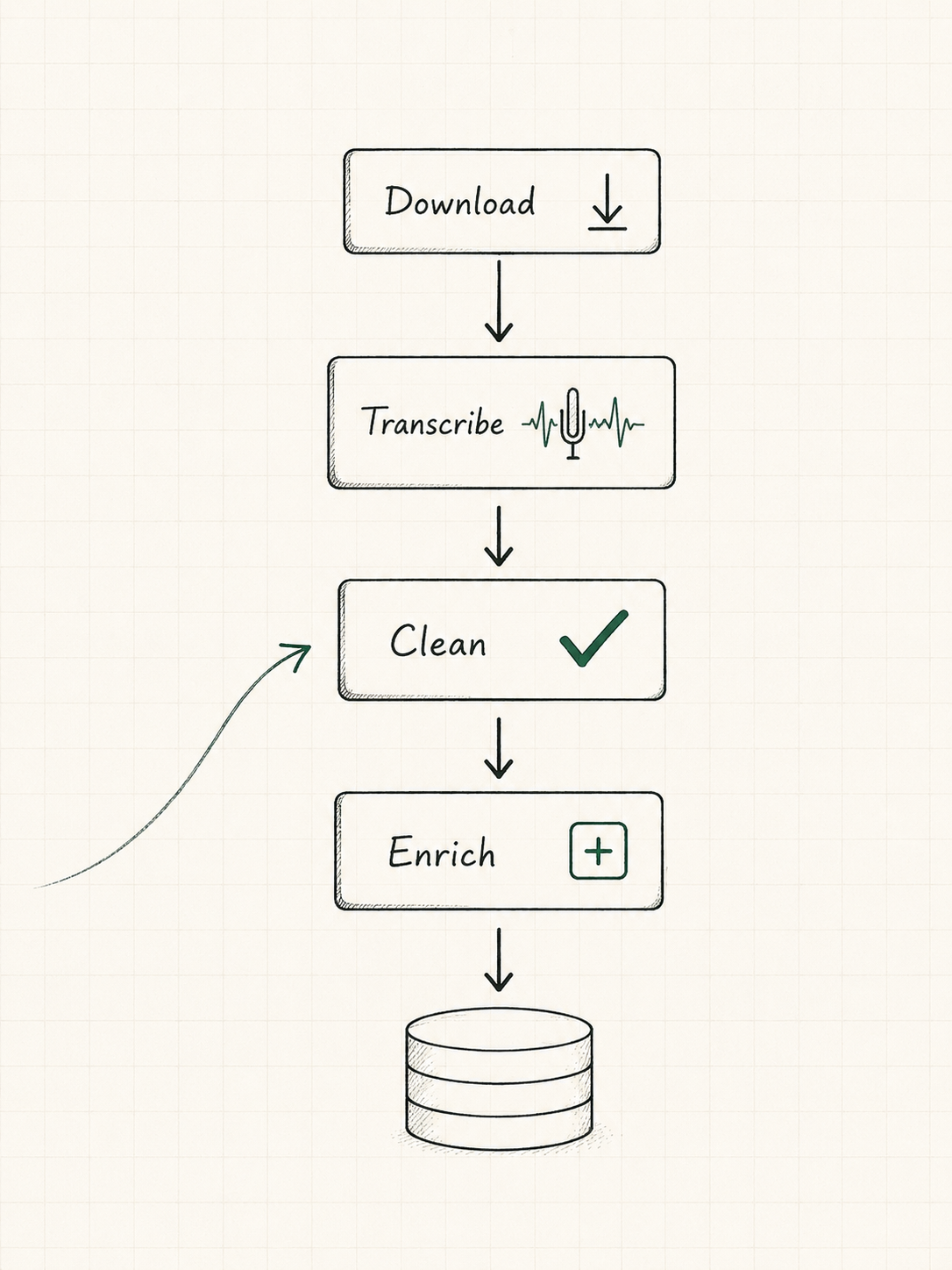
The full pipeline: download, transcribe, clean, enrich, and export.
Lower cost, more control, better privacy, and more room to experiment.
What surprised me about turning scattered content into a useful system.
About
I'm a finance student and AI builder who likes working at the intersection of markets, data, and technology. I build practical tools that save time, surface insight, and help people and businesses make clearer decisions.
My projects usually start with a practical bottleneck: POS exports that hide inventory risk, sourcing lists without follow-up rhythm, saved content that cannot be searched, or marketplace photos that need a clearer read.
Always building. Always learning.
What I care about
I study finance, markets, and business operations so the tools I build stay tied to real choices.
I use AI, automation, and structured data to turn repeated work into clearer operating rhythms.
I learn by building small, testable projects that make messy information easier to act on.
About me
Built early experience through creating paid ads and running social campaigns for small firm. Wrote "How to Launch a Podcast for your Brand" guide and helped 2 brands launch podcasts.
Developed a stronger foundation in finance, markets, business decision-making, and structured problem solving.
Applied finance through company research, stock analysis, investment discussions, and pitched investment ideas to the fund.
Shadowed finance department at Lamb Weston.
Expanded into deeper research on strategic industries, market structures, supply chains, and the forces affecting business decisions. Built strategic research on rare earth and critical minerals. Market dynamics, supply chains, and geopolitical risks.
Built data automation, and evaluation workflows. Worked on structured task evaluations and app workflows to train AI models for macOS.
How I work
I dig into the root cause before jumping to solutions.
I ship small experiments, learn what works, and iterate quickly.
I focus on tools and systems that create outsized impact with minimal friction.
If it does not help someone make a better decision, it is not worth building.
Toolbox
Beyond the screen
Reset button. Best ideas come after a round.
I write everything down. Future me says thanks.
I ask a lot of questions and follow the trail.
Always reading, exploring, and staying curious.
Notes
I write to clarify my thinking, connect ideas, and track what I'm learning as I build. These notes are a record of the problems I'm trying to solve, the systems I'm building, and the lessons I keep coming back to.
Always building. Always learning.
Build smarter, not busier.
Better decisions with data.
Structure creates freedom.
Leverage compounds.
Share to get better.
Featured notes
Downloading, transcribing, cleaning, enriching, and turning saved content into something searchable.
Lower cost, more control, better privacy, and more room to experiment.
Lessons from turning scattered content into a system I could actually use.
Things I've learned
Most useful insight comes from organizing what already exists, not endlessly collecting more.
The biggest wins often come from simple repeatable systems, not complicated software.
When I define the problem well, the tools become much more useful.
Running things privately and cheaply makes it easier to test more ideas.
Writing down the process usually reveals what matters and what still needs work.
Saved content, notes, transcripts, and raw data become valuable when the structure is good.
Note library
Contact
I'm especially interested in finance, retail operations, sourcing, automation, markets, and practical systems that make the next action clearer.
Featured project
A local-first AI pipeline that turned saved Instagram Reels into transcripts, structured fields, scoring signals, and a searchable Excel dataset.
Overview
A local AI pipeline that converted saved Instagram Reels into searchable transcripts, structured fields, scoring signals, and an Excel dataset.
Saved short-form video holds useful ideas, but it is hard to search, compare, prioritize, or turn into action without structure.
What changed — the archive became a private decision-support layer for learning, building, filtering ideas, and spotting repeated themes.
In short
Turn saved reels into text and fields that could be reviewed without rewatching everything.
Download, transcribe 500k+ words, enrich with Llama 3.1, score, and export every record.
609 structured records, 100% enrichment completion, $0 marginal API cost, and ~7× faster inference.
Problem
Instagram Reels can contain tool ideas, business angles, workflows, and market signals. Saving a reel keeps the video, but it does not capture the idea in a way that can be searched, compared, filtered, or reused.
609 short videos, scattered context, and no reliable way to compare ideas across creators or topics.
609 transcripts, 500k+ words, and enriched records organized into a dataset that can be filtered and scored.
System
Four stages move a saved reel from raw video to a structured, scored record. Select a stage to see what it does.
Personal archive item with context trapped inside video.
500k+ words became searchable source material.
Topic, tools, skills, opportunity, actionability, leverage, novelty.
A comparable record that can be filtered, ranked, and reviewed.
Python and yt-dlp pulled down saved Instagram Reel videos using cookie-authenticated access and per-record state tracking.
Optimization
Qwen 3 kept entering reasoning-heavy extraction behavior at roughly 150 seconds per record. This task needed clean field extraction, not extended reasoning.
About 7× faster inference and more consistent JSON output with Llama 3.1 8B.
609 LLM calls on a paid API can add up and would move private saved-content data off-machine.
$0 marginal cost, fully private processing, and repeatable enrichment on demand.
Intelligence layer
{
  "creator": "...",
  "topic": "local AI workflow",
  "content_type": "AI_TOOL",
  "concepts": ["agent workflows", "local inference"],
  "tools": ["Ollama", "Whisper"],
  "opportunities": ["automation service for SMBs"],
  "future_signals": ["on-device models"],
  "skills": ["Python", "prompt engineering"],
  "actionability": 8,
  "leverage": 9,
  "novelty": 7
}
Every reel became comparable by creator, topic, concept, opportunity, future signal, skill, and score.
The schema turned a pile of transcripts into rows that could be searched, filtered, ranked, and reviewed.
Actionability, leverage, and novelty made the dataset useful for deciding what was worth acting on.
Dataset use
Turned video content into searchable text.
Converted messy reels into consistent rows and columns.
Scored ideas by actionability, leverage, and novelty.
Surfaced recurring themes across hundreds of saves.
Helped decide what to learn, build, ignore, or act on.
Results
Conclusion
Signal Vault was not just a transcription project. It created a structured dataset that can be searched, filtered, scored, and reviewed to decide what to learn, build, ignore, or act on.
Featured system
A local-first origination OS for off-market SMB deal sourcing. Flyover turns a static target list into a working dispatch system: which companies to contact, why they rank highly, what touch is due next, and which buyers might fit if an owner replies.
Overview
Flyover was built around a simple operating problem: target lists are easy to create, but hard to work consistently. The project turns a list of potential SMB acquisition targets into a dispatch system with priority, cadence, replies, and buyer fit.
A local web app for managing off-market SMB sourcing from target import through buyer matching.
The value is knowing who deserves the next touch, what needs to happen today, and how to act when an owner replies.
What changed — a spreadsheet became a workflow system with one clear next action per active company.
In short
Move off-market SMB sourcing out of scattered spreadsheets, notes, and memory.
Import targets, score conviction, schedule outreach, track replies, and match buyer mandates.
Every active company has a next action, every score has a reason, and every reply can move toward buyer fit.
Problem
Unclear priority, manual follow-up, forgotten next steps, no reply workflow, and no clean buyer handoff.
Ranked target universe, scheduled cadence, sent/skipped/replied history, buyer matching, and explainable score.
System flow
Bring in a CSV target universe with flexible header matching.
Rank companies using transparent conviction factors.
Start cadences and work from the due-today board.
Cancel pending touches when an owner responds.
Compare the company against buyer mandates with rationale.
Dispatch board
Flyover is designed around daily action. Instead of asking the user to browse a database, it shows what must go out today, ordered by conviction score.
Conviction scoring
The scoring layer does not try to be magic. It creates a priority system the operator can inspect, argue with, and adjust.
{
  "owner_tenure": "long-held businesses score higher",
  "owner_age": "succession risk signal",
  "succession_signal": "retirement or no-heir evidence",
  "industry_durability": "essential local services rank higher",
  "revenue_fit": "lower-middle-market target bands",
  "geography": "Upper Midwest focus",
  "digital_weakness": "less visible businesses surfaced"
}Cadence engine
Creates the first pending touch.
Schedules the next touch immediately.
Records the skip, then continues the sequence.
Cancels pending touches and moves to human judgment.
Kills the company record.
Moves dormant with a 180-day re-engage touch.
Buyer matching
When an owner responds, the next question is not where the buyer spreadsheet went. It is which buyer mandate fits this company and why.
fire protection · SD · 3_10m revenue band
Example uses fictional demo data from the seed file.
Technical architecture
A one-person sourcing operation needs a reliable local file, not unnecessary cloud infrastructure.
The product is form-driven and workflow-heavy, so server-rendered templates keep state simple.
Clear routes and form actions for queue, universe, company, buyer, and import workflows.
The repo includes tests for scoring determinism, pending-touch invariants, reply cancellation, queue ordering, and match rationale.
What I built
Flexible CSV header matching and duplicate skipping by company name.
Explainable 100-point conviction model with factor-level breakdowns.
Cadence state machine with next-touch enforcement.
Daily action surface ordered by conviction.
Score breakdown, touch history, reply logging, and buyer matches.
Mandate storage with fit rationale for warm replies.
Design decisions
A company list only matters if it creates action.
A sourcer needs to trust and adjust the priority model.
The first version is for a single operator and should not require cloud setup.
The workflow needs rules: sent schedules next, reply cancels pending, skip is recorded.
What this demonstrates
Reflection
It does not try to become a full private-equity platform. It focuses on the part of sourcing that breaks first: consistent follow-up. The project turns a scattered target list into an operating rhythm, where the next action is always visible and the logic behind each priority is inspectable.
Featured project
A Chrome extension that helps collectors evaluate card centering directly from eBay listing photos before buying. It turns a raw marketplace image into a visual centering workspace, then translates the alignment into a readable centering score, buyer signal, and risk flag.
Overview
Collectors often judge centering from marketplace photos by eye, but small centering issues can affect perceived condition and grading potential. This extension adds a clearer pre-purchase read directly where the buyer is already evaluating the card.
A Chrome extension that takes eBay listing images of cards into a workspace where it gives an accurate centering score.
It gives buyers looking for mint-condition cards that could grade high more confidence in one of the hardest parts of grading.
What changed — instead of guessing from a listing photo, the buyer can align the card edge and printed border, then get a readable centering score, buyer signal, and risk flag.
In short
Make one important condition factor easier to evaluate from imperfect eBay listing photos.
Inject a browser-based centering workspace directly onto listing images.
A raw listing photo becomes a clearer centering read that helps buyers make better decisions.
Decision layer
Generated from the current listing image and edge-to-border alignment.
Problem
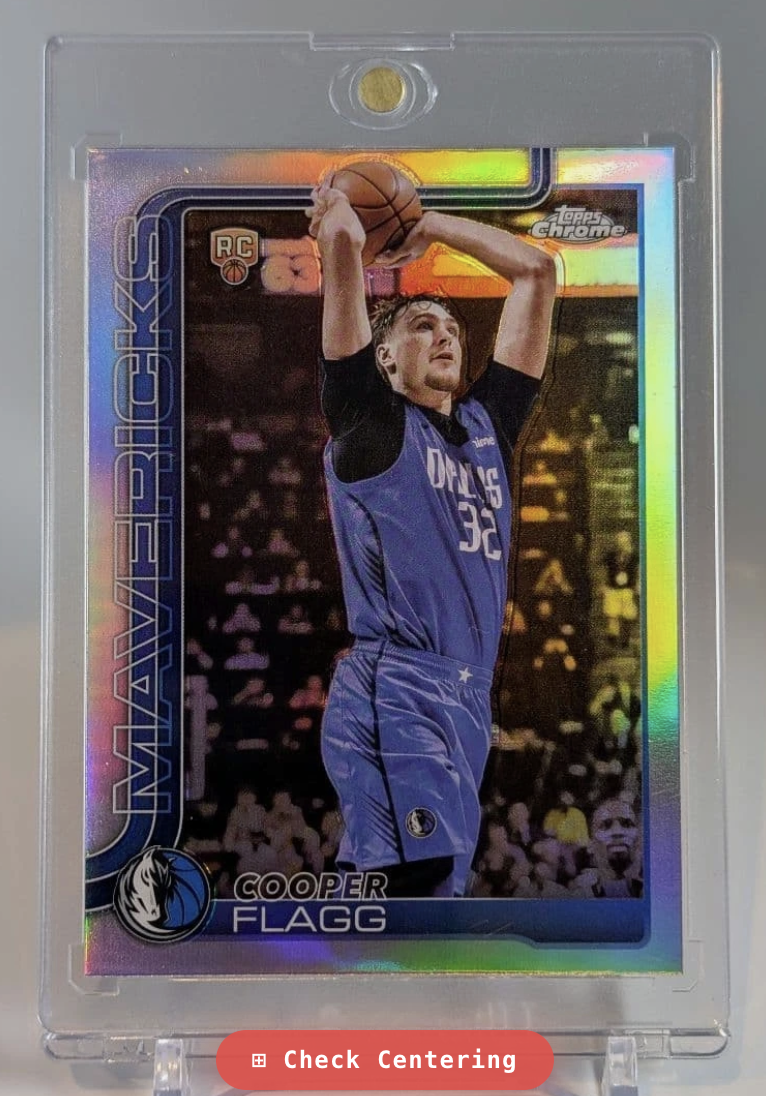
eBay photos are often enough to see the card, but not enough to confidently compare how the printed design sits inside the physical edge. The tool makes that visual judgment more structured before a collector commits to a purchase.
Visual information is present, but the buyer still has to estimate centering without measurement structure.
The same photo becomes easier to interpret with an alignment workspace and buyer-facing output.
System
Start from the card photo being evaluated.
Align the physical card edge and printed design border.
Compare horizontal and vertical edge gaps.
Translate the measurement into a clearer buyer-facing centering output.
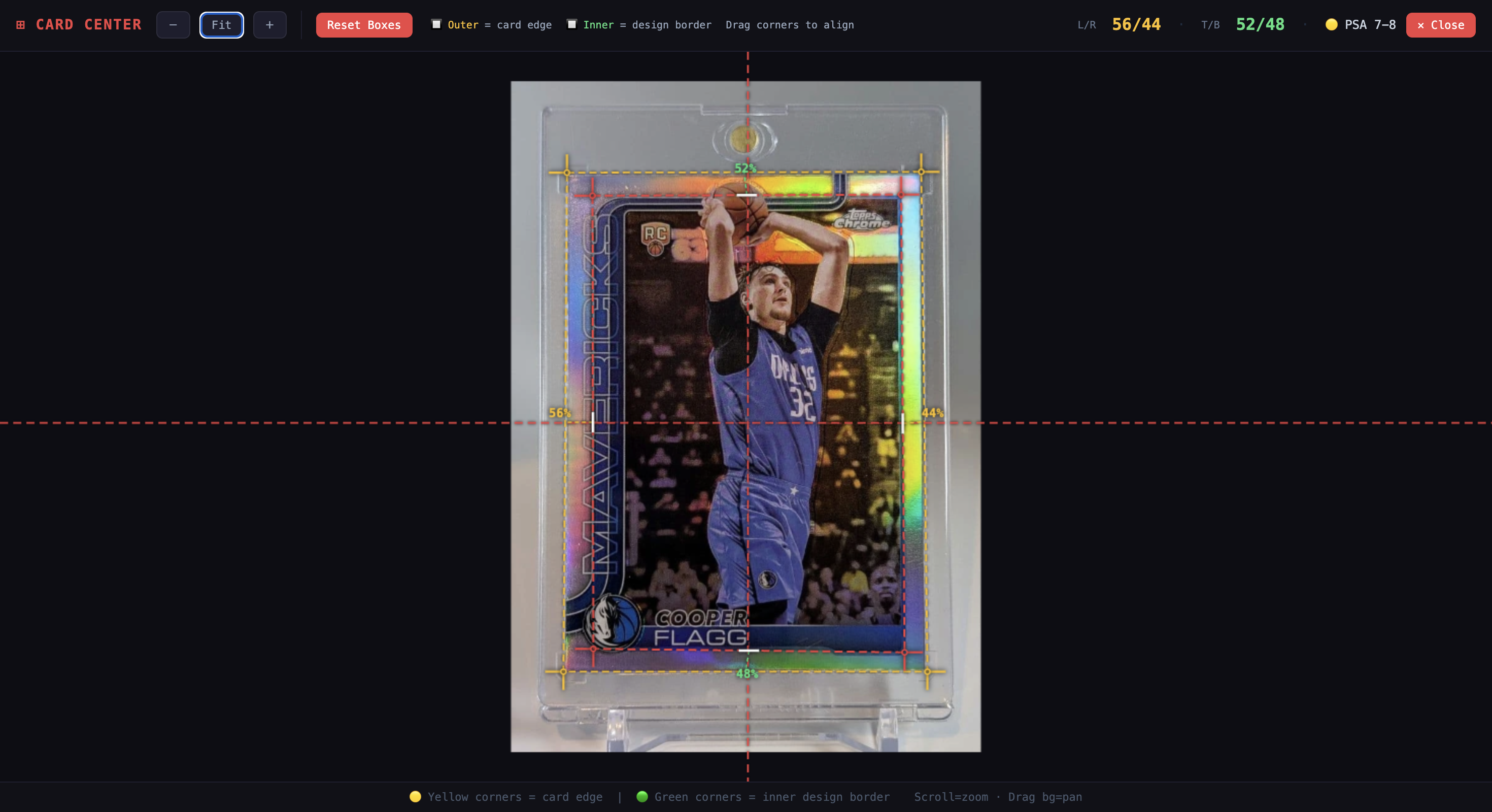
Measurement workspace
The outer guide maps to the physical card edge.
The inner guide maps to the printed border inside the card.
Centerlines and labels show how the spacing is distributed.
The buyer adjusts the guides because marketplace photos vary in crop, angle, cases, glare, and lighting.
Technical build
MV3 extension configured for eBay listing pages and image-hosting domains.
Runs on eBay pages, identifies the main visible image, and injects the trigger button.
Draws the card image, alignment guides, handles, labels, and centering stats in one controlled workspace.
Supports guide handles, background pan, scroll zoom, fit-to-screen, and reset behavior.
Measurement logic
The tool compares the distance between the outer card edge and the inner printed border on each side. Left and right gaps become horizontal centering. Top and bottom gaps become vertical centering. The output becomes a practical centering read from the available listing image.
{
  "outer": "physical card edge",
  "inner": "printed design border",
  "horizontal": "left gap / right gap",
  "vertical": "top gap / bottom gap",
  "output": "centering score + buyer signal"
}
The measurement starts with user alignment because listing photos vary in angle, crop, lighting, glare, cases, and stands.
The centering read gives a clearer signal, but it does not grade corners, edges, surface, authenticity, or final value.
Design decisions
Listing photos vary too much in angle, lighting, holders, glare, and crop quality for a simple auto-detect promise.
The user stays in control and can align the guides to the visible evidence in the listing photo.
The tool is most useful at the moment a collector is evaluating a listing.
No separate upload flow is required before getting a centering read.
Canvas made it easier to draw the image, guide lines, dashed borders, handles, labels, and crosshairs together.
The measurement layer feels like one controlled workspace instead of separate floating DOM pieces.
What this demonstrates
Packaged a narrow utility as a browser-native workflow.
Found and enhanced the listing image without requiring a separate app.
Rendered image, guides, handles, labels, and lines inside one measurement layer.
Kept measurement points aligned through zoom, pan, and screen-to-image conversion.
Solved one collector workflow without overstating what the tool can do.
Reflection
Sports Card Centering Checker does not try to become a full grading platform. It takes one judgment collectors already make by eye and gives them a structured way to make that judgment more consistently from the listing image in front of them.
Case study · Research + workflow design
Almost everyone has met AI. Almost no one has been shown what to do with it. This is a look at the gap between access and usefulness and the one skill that closes it. Turning a messy, repeated task into a workflow someone can actually reuse.
Overview
Why people have a near universal access to AI but still struggle to make it useful. and what actually changes when they do.
The people who could benefit most are small teams, local businesses, nonprofits, students, solo operators who all have the least time to experiment their way to a system.
Current sources I trust on this: Pew, the U.S. Census Business Trends survey, McKinsey and HBR, Microsoft's Work Trend Index, MIT, the SBA, NFIB, and a 2026 field experiment from INSEAD.
The next useful AI skill isn't prompting. It's workflow translation: taking a repeated task and turning it into a reliable, reusable system.
The thesis in one line — the gap isn't access to AI. It's the missing step between a tool and a workflow, and that step can be designed.
In short
People try a chatbot once, get a generic answer, and quietly go back to doing the task by hand.
Synthesize current adoption and barrier research, then turn the pattern into a framework and a buildable concept.
Usefulness comes from translating a repeated task into inputs, instructions, a review step, and a reusable output.
The core problem
Access is basically solved: the models are cheap or free and built into the tools people already use. But usefulness leaks out at every step between “I have AI” and “AI helps me get this done.” The funnel doesn't convert. It drains.
This isn't only a beginner problem. MIT's NANDA initiative found that roughly 95% of enterprise generative-AI pilots produced no measurable impact and concluded the cause was approach, not model quality. If well-funded companies leak at the workflow step, a two-person shop has no chance without help.
Heavy users, but often using AI to finish work instead of to learn it and have no model of what good looks like.
NFIB found only 24% of small employers use AI and 42% aren't familiar with it. No time to experiment, real worry about accuracy.
High adoption, low impact usually one staffer drafting with AI while everyone else stays buried in manual work.
Microsoft found 80% of workers lack the time or energy for the work which is the very condition that prevents fixing it.
They are the whole company. Every hour spent figuring out AI is an hour not earning, so the bar for “worth it” is brutal.
The framework
“Is this AI any good?” is the wrong question. The better question is whether the work around the model is set up well. These six dimensions are how I judge that and each comes with the question to ask yourself.
A model can't hit a target you can't name. Vague task in, vague answer out.
Ask: can I state the task in one sentence?
Most “AI failures” are missing-context failures. The model can't know what you didn't give it.
Ask: does it have the facts this needs?
The person decides what matters, what's true, and what's safe to send. The model proposes; the human disposes.
Ask: who is checking this, and against what?
Useful output is in the format you'll actually use, not a wall of text you have to rework.
Ask: can I use this as-is, or near it?
The first draft is a draft. Anthropic's 2026 fluency analysis found iteration was the strongest predictor of getting real value.
Ask: did I refine, or accept the first answer?
It only counts if it produces a decision or an artifact you act on and if you can run it again next week.
Ask: did this change what I do, repeatably?
From prompt to value
The same six dimensions show up as a process. Select a stage to see its real job and notice how little of the value lives in the AI draft itself.
It starts with a real question or task, not a tool. “Write me something” goes nowhere. “Reply to this refund request in our voice, under 120 words” gives the model a target.
The point — five of the six steps are human work. The AI draft is the cheap part. Skip the human steps and you get fast, confident, unusable output.
What the research shows
I didn't want a pile of statistics. I wanted the few findings that actually change how you'd build something. Expand each for why it matters and what it implies.
A 2026 INSEAD field experiment gave 515 startups identical AI tools, training, and credits. The only group that pulled ahead was the one told how to reorganize their work around AI and they found 44% more use cases and generated roughly 1.9× the revenue of peers who used the same tools just to go faster.
For design: don't teach tools. Help people find and re-shape the repeated task.
INSEAD working paper, 2026Anthropic's 2026 fluency analysis found that 85.7% of substantive conversations involved refining a previous answer and that iteration predicted every other good behavior. The people who get value treat AI as a back-and-forth, not a vending machine.
For design: build the loop in. A review-and-refine step means users don't have to know to do it themselves.
Anthropic AI Fluency Index, 2026The gains are real when AI is embedded in a defined task it shows a 14% average productivity lift in customer support, and 34% for the least-experienced workers. But HBR and McKinsey note that verification and rework quietly eat those savings when there's no checkpoint.
For design: a defined check isn't friction. It's what makes the speed bankable.
NBER (Brynjolfsson et al.); HBRAcross small-business surveys, the top barriers are accuracy, data privacy, no clear use case, and the learning curve. It is not price. The SBA found 82% of firms with fewer than five employees say AI simply “isn't applicable” to them, which reads as a use-case gap, not a true mismatch.
For design: you can't price past distrust. Show what good looks like, keep a human in the loop, and say when not to use AI.
SBA Advocacy (2025); SMB surveysAdoption tends to be wide but shallow: U.S. Census data shows most AI-using firms apply it in three or fewer functions. Tools don't adopt themselves instead usually it's one motivated person, and the workflow leaves when they do.
For design: make the workflow itself the owner. A reusable artifact carries the instructions so it doesn't depend on one person.
U.S. Census BTOS, 2025–26The difference
Same tool, same model, completely different result. The difference is entirely in the work around the prompt.
A salon answering the same DMs all day. Basic use: type “reply to this” and hope. Designed workflow: a saved template with the services, prices, hours, and tone, plus “never invent a price leave a [CHECK].” Paste the message, get a draft, glance at it, send. Five minutes of writing becomes thirty seconds of checking, and it works the same way tomorrow.
Try it
Pick a repeated task where you already use AI and rate it on the six dimensions. Nothing is pre-filled. This is your read of your own workflow. The summary updates as you go.
Can you state the task in one sentence?
Does the model get the facts it needs each time?
Can you quickly tell whether it's right?
Is there a defined moment where a person checks it?
Can you run it again next week in under a minute?
Does it end in a decision or artifact you act on?
Rate each part of a workflow you actually run and the summary updates as you go.
Reusable prompts
The blank box is the enemy. These are starting points for the most common repeated tasks so try and copy one and fill in the brackets.
Here are my raw notes from [meeting / call / brainstorm]: [paste notes]. Turn them into: (1) decisions made, (2) action items with an owner and a due date, (3) open questions, (4) risks to watch. If something is unclear or missing an owner, list it under "needs clarification" instead of guessing.
You're helping me answer customer messages for [business type]. Our tone is [warm / professional / casual]. Key facts: [hours, prices, policies]. Here's a reply I was proud of, as a style example: [paste]. Now draft a reply to this message: [paste]. Keep it under [X] words. Never invent prices, dates, or policies — if you don't have a fact, leave a [CHECK] placeholder.
I do this task repeatedly: [describe the task]. Help me turn it into a reusable workflow. Ask me for: (1) what a good result looks like, (2) what inputs it needs each time, (3) any constraints or things to never do. Then give me: a reusable instruction block, a short review checklist, and one example. Keep it simple enough that a busy non-expert could run it.
Review this AI-generated [email / summary / post] before I use it: [paste]. Check for: (1) factual claims that might be wrong or unverifiable, (2) anything confidential or sensitive, (3) tone mismatches for [audience], (4) anything overstated or invented. List issues as a short checklist with fixes. Don't rewrite it unless I ask.
What I'd build
This part is a prototype direction, not something I've shipped. If the gap is translation, then the thing worth building isn't another AI tool it's the missing layer between a tool and a workflow. A small, opinionated kit that does the translation for nontechnical people.
A five-minute form: “what do you do over and over that you wish took less time?” It diagnoses the repeated task instead of asking people to imagine use cases.
One workflow card per common job — customer reply, meeting to tasks, feedback synthesis — each carrying the instructions, an example, and a review checklist, pre-filled.
A plain-language “when not to use AI” note on every card with legal advice, sensitive data, high-stakes facts. Naming the no-go zones is what earns trust for everything else.
A saved set that grows over time, so the workflow belongs to the team and not to one motivated person who might leave.
Encouragingly, this is already a fundable need: NTEN's free “AI for Nonprofits”, supported by Anthropic, exists specifically to walk stretched, nontechnical teams through launching one real AI project and proof the translation layer is real, not just an idea.
What this demonstrates
I see AI adoption as a workflow-design problem, not a tool problem.
I turn a vague idea into a framework and a buildable concept.
I find current, credible evidence and notice when two numbers measure different things.
I can make a messy topic scannable without dumbing it down.
Small first wins, human review, reusable templates, and naming the limits.
Takeaway
The models are already good enough. The gap is that the people who'd benefit most have the least time to figure it out, and almost no one is doing the unglamorous translation work that would help them. That's the reframe I keep coming back to: stop teaching people to prompt, and start helping them turn a repeated task into a system they can actually use.
Sources
Awareness vs. use of AI: 95% of US adults have heard of AI; about a third have used a chatbot, and only a third of those found it very helpful.
The rigorous adoption floor: ~18% of US firms used AI in a business function, and most use it in three or fewer functions.
The GenAI Divide: ~95% of enterprise generative-AI pilots showed no measurable P&L impact; the cause was approach, not model quality.
Field experiment, 515 startups: the group that reorganized work around AI earned ~1.9× the revenue of peers with identical tools. (Working paper, not yet peer-reviewed.)
AI Fluency Index: 85.7% of substantive conversations involved iteration, the strongest predictor of effective use.
Small-firm reality: 24% of small employers use AI, 42% aren't familiar with it, and 82% of sub-five-employee firms say AI “isn't applicable.”
Work Trend Index: 80% of workers say they lack the time or energy for the work; interruptions hit roughly every two minutes.
Brynjolfsson et al.: 14% average support-productivity gain (34% for novices); HBR on how rework erodes savings without a review step.
Figures are reported as the sources state them. The INSEAD result is a 2026 working paper with partly self-reported revenue, so I've flagged it rather than leaning on it as settled fact.